
There is a joke buried in this article and it is on all of us.
The reason you want to run a language model at home is the AI boom. And the reason the graphics card to do it with costs what it costs, right now, is also the AI boom. The same wave that put a chatbot in front of you and made you think “I could host that myself” has hoovered up the world’s memory supply to feed datacentres, and left the rest of us paying over the odds for a card with enough VRAM to be interesting.
So this guide is going to be blunt about the state of the market, and then it is going to tell you what to buy anyway, because the hardware you already own is often closer to useful than you think.
The short answer
If you want the recommendation without the reasoning, it is this:
| If you want | Buy | VRAM | Runs |
|---|---|---|---|
| The cheapest useful start | Used RTX 3060 12GB | 12 GB | 14B |
| The best new mainstream card | RTX 5060 Ti 16GB | 16 GB | 14B with long context |
| Most memory per pound, new | Intel Arc B580 | 12 GB | 14B |
| The enthusiast standard | Used RTX 3090 | 24 GB | 32B |
| The same, from AMD, new | RX 7900 XTX | 24 GB | 32B |
| No compromises | RTX 5090 | 32 GB | 32B with room to spare |
The rest of this guide explains why those are the answers, and what each tier actually gets you.
Why there are no prices in this guide
Two reasons, and neither is laziness.
The first is that GPU prices in 2026 move faster than any article can track. Quoting a number today makes this page wrong by the weekend and misleading by Christmas.
The second is that price is not the specification you should be shopping on. VRAM is. A cheaper card with more memory will run models that an expensive card with less memory simply cannot load, no matter how fast its cores are. Organise your thinking by memory tier and the buying decision gets much simpler.
Where you see a link to a retailer, the current price is on the other end of it, which is the only place a price is ever accurate.
The market, honestly
If you have been away from GPU pricing for a couple of years, brace yourself.
AI datacentre demand has consumed the memory supply. The three big DRAM makers have shifted production toward high-bandwidth memory for AI accelerators, because the margins are enormous compared to the GDDR that goes on consumer graphics cards. Contract prices for conventional DRAM rose by around 90% in a single quarter earlier this year, and IDC has forecast that AI datacentres could take as much as 70% of global memory output in 2026. Analysts do not expect meaningful relief until new fabrication capacity arrives, realistically late 2027 or beyond.
That flows straight through to the shelf. Cards trade well above their launch prices, and the memory-heavy models that local AI people actually want are the worst affected, because they are the ones competing most directly with the datacentre for the same chips.
It also explains the strange quiet on the release calendar, which is the next question everybody asks.
Should you wait for the next generation?
Short answer: do not plan around it.
NVIDIA does not publish a consumer roadmap. Announcements arrive at CES in January, GTC in March and Computex in May or June, and that is the entire schedule anyone outside the company has to work with.
What is expected, and repeatedly delayed, is a “Super” refresh of the RTX 50 series. The rumoured specifications are exactly what a local AI user would want, because they are memory bumps rather than core-count bumps: 24 GB on the 5080 Super and 5070 Ti Super, 18 GB on the 5070 Super, 12 GB on the 5060 Super.
The timeline has slipped all year. NVIDIA said before CES 2026 that it would not announce new GPUs there. Reports through the middle of the year had the launch pushed to the third quarter, then to the end of the year, and the most recent reporting suggests CES 2027 at the earliest. One report goes further and claims no new RTX gaming GPUs in 2026 at all.
The reason is not hard to guess. A refresh whose entire selling point is more memory is a difficult product to launch into a memory famine.
So: if you want to experiment with local models this year, buy something now and enjoy it. If you are happy to wait indefinitely for a card that may appear in January, or may not, wait. What you should not do is postpone a hobby for a launch date that has moved four times.
This section is a snapshot from August 2026. Rumours age badly, so check the date at the top of this page before relying on it.
The only specification that really matters
Everything about local inference comes back to one question: does the model fit in the card’s memory?
If it fits, the model runs at the speed of the card’s memory bandwidth, which on any modern GPU means faster than you can read. If it does not fit, the inference engine quietly spills part of the model into system RAM, and speed collapses from tens of tokens per second to low single digits. There is no gentle degradation. It is a cliff.
Which is why the buying guide is a memory guide.
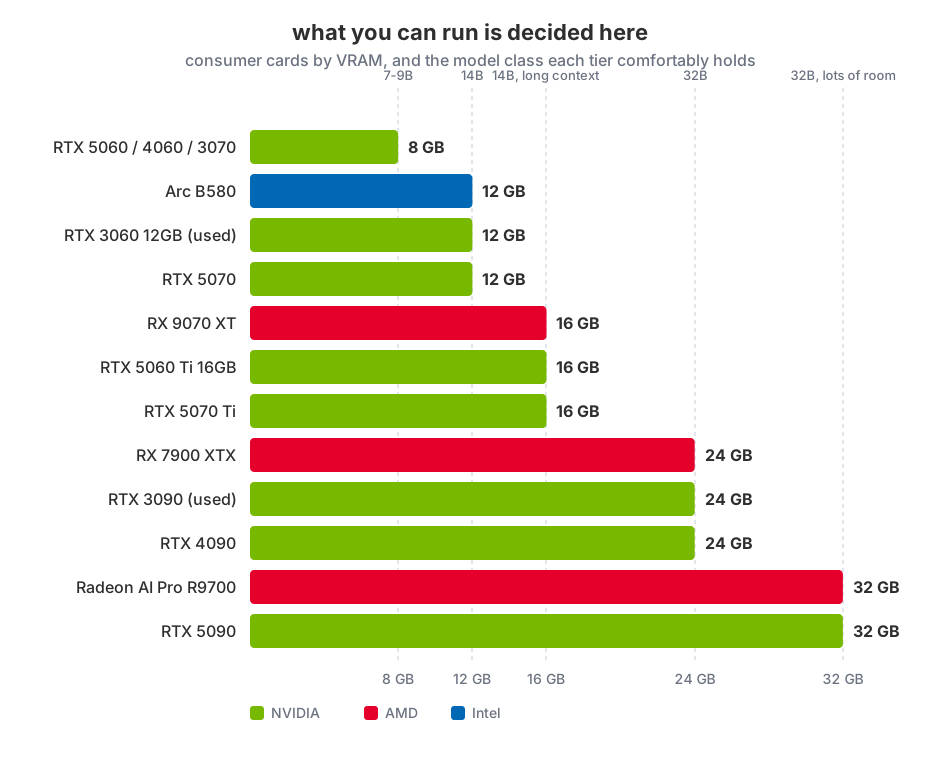
If the vocabulary in that chart is unfamiliar, the jargon explainer covers parameters, quantisation and the KV cache in plain English. The short version: models are sized in billions of parameters, quantisation shrinks them to roughly half a byte per parameter, and context length eats memory on top of the weights.
The tiers
8 GB: the entry point, and more capable than you expect
Runs: 7-9B models at Q4_K_M, with 8K to 16K of context.
This is the tier most people already own without realising it counts. An RTX 3070, 4060 or 5060 will run a current 8B instruct model entirely on the GPU at 35-50 tokens per second, which is comfortably faster than reading speed.
What you give up is context length and headroom. Long documents need chunking, and 14B models are out of reach. If you have one of these cards already, start here before spending anything. A great many people discover 8B is enough for what they actually do.
12 GB: the value sweet spot
Runs: 14B models at Q4_K_M, or 8B with generous context.
The jump from 8 GB to 12 GB is the single most valuable upgrade step in this entire guide, because it opens the 14B class, and 14B is a noticeable step up in reasoning quality over 8B.
The used RTX 3060 12GB is the enduring bargain here: a mid-range gaming card from 2021 that happens to carry more memory than several newer, more expensive cards. It is not fast by modern standards, but it fits models that a 5060 cannot, and fitting is what matters. The Arc B580 and RTX 5070 also land in this tier.
16 GB: comfortable
Runs: 14B with long context, or 8B with very long context and an embedding model alongside.
The RTX 5060 Ti 16GB, RTX 5070 Ti and RX 9070 XT live here. This is where you stop thinking about memory constantly. You can run a chat model, an embedding model for document retrieval, and a long context window without the arithmetic getting tight.
24 GB: where local starts to feel serious
Runs: 32B models at Q4_K_M, the point at which output quality starts to feel close to cloud models for a lot of everyday work.
Three routes in. The used RTX 3090 remains the enthusiast’s answer and has done for years: 24 GB, strong memory bandwidth, and available second-hand because gamers moved on. The RTX 4090 is the same capacity, considerably faster, considerably more expensive. The RX 7900 XTX offers 24 GB from AMD, which used to come with a software asterisk and increasingly does not.
If you are serious about this hobby and buying one thing, this is the tier to aim at.
32 GB and beyond: diminishing returns arrive slowly
Runs: 32B with room to spare. 70B remains out of reach on a single card at usable quantisation - that needs roughly 48 GB.
The RTX 5090 brings 32 GB to the consumer line at a price the memory shortage has made genuinely eye-watering. AMD’s Radeon AI Pro R9700 offers 32 GB aimed squarely at this workload, and Intel’s Arc Pro cards reach 24 to 32 GB at notably lower power draw.
Two 24 GB cards will also get you to 48 GB, since inference engines split a model’s layers across GPUs. Be aware that the whole thing then runs at roughly the pace of the slower card, and that you have just signed up for PCIe lane arithmetic and a much bigger power supply.
The cards worth buying
Named picks, tier by tier. Where a card is best bought second-hand, that is what the link points at, because in this market it usually is.
RTX 5060 8GB - only if it is what you already have
The entry card of the current generation, and honestly not one to buy for AI. 8 GB runs an 8B model well and stops there. If it is already in your machine, start here and spend nothing. If you are choosing, spend a little more and get 12.
Better value at this tier is a used RTX 3070, which is faster and equally memory-limited, and cheap now that it is three generations old.
RTX 3060 12GB - the value pick, and it is not close
A mid-range gaming card from 2021 that carries more memory than several newer, pricier cards. It is not fast. It does not need to be. It fits 14B models that a 5060 cannot load at all, and fitting is the whole game.
This is the card to buy if you want to find out whether local AI is a hobby you will keep, and the one I would recommend to most people starting out.
Intel Arc B580 - most memory per pound, new
12 GB at a price NVIDIA does not match, with lower power draw. The trade is software maturity: Intel’s stack works with the mainstream tools but you will occasionally be the person filing the bug rather than reading someone else’s.
Good choice if you enjoy tinkering. Frustrating if you want it to just work.
RTX 5070 - current-generation 12 GB
Faster than the 3060 by a wide margin, same memory ceiling. Worth it if you also game; hard to justify on AI grounds alone, since the models it runs are the models the cheaper card runs.
RTX 5060 Ti 16GB - the mainstream sweet spot
The card I would point most new buyers at if they are buying new. 16 GB is where you stop doing memory arithmetic: a 14B model, a long context, and an embedding model for document search, all resident at once.
RTX 5070 Ti and RX 9070 XT - 16 GB with more speed
Same memory as the 5060 Ti, considerably more performance. For inference specifically, the extra speed matters less than you would think, since a model that fits already generates faster than you read. Buy these if you also game seriously.
RTX 3090 - the enthusiast standard, used
24 GB with strong memory bandwidth, available second-hand because gamers moved on, and the reason it has been the local AI community’s default for years. It runs 32B models, which is the tier where output starts feeling close to cloud quality for everyday work.
Buy it used, and test it properly on arrival - the used GPU checklist exists mostly because of this card. Check memory junction temperatures specifically; baked thermal pads are the standard fault.
RTX 4090 - the same memory, much more speed
24 GB again, considerably faster, considerably more expensive. Worth it if you are generating constantly or fine-tuning; overkill if you are chatting with an 8B model in the evenings.
RX 7900 XTX - 24 GB from AMD, new
The cheapest route to 24 GB with a warranty. ROCm now runs Ollama, llama.cpp and vLLM without heroics, so for running models this is a legitimate choice. The asterisk applies if you plan to fine-tune or run brand new research code, where CUDA’s absence is still felt.
RTX 5090 and Radeon AI Pro R9700 - 32 GB
The top of the consumer tree. 32 GB runs 32B comfortably with room for long context and an embedding model, but stops short of 70B, which needs roughly 48 GB and therefore two cards.
The R9700 is aimed squarely at this workload and undercuts the 5090 substantially.
NVIDIA, AMD or Intel?
The old advice was “buy NVIDIA, everything else is a research project”. That advice is now out of date, and holding onto it will cost you money.
NVIDIA remains the path of least resistance. CUDA is what every inference engine targets first, every troubleshooting thread assumes, and every new project supports on day one. You will never be the person discovering that a tool does not work on your hardware. You pay for that in memory per pound, where NVIDIA’s consumer line has been stingy for years.
AMD has closed most of the gap for inference specifically. ROCm now runs Ollama, llama.cpp and vLLM without heroics, and AMD’s own developer tooling has matured considerably. For running existing models, which is what this guide is about, a 24 GB Radeon is a legitimate choice and often a cheaper route to the memory you actually need. The caveat is that if you move from running models to training or fine-tuning them, or you want the newest research code the week it drops, you will feel CUDA’s absence.
Intel is the value outlier. Arc cards deliver more memory per pound than either competitor and draw less power, and the workstation Arc Pro parts reach 24 to 32 GB. The software story is the least mature of the three, so budget some patience.
There is also a fourth answer people forget: Apple Silicon. Unified memory means the GPU can address the whole system pool, so a Mac with 32 or 64 GB runs models that no consumer graphics card can touch. It is slower than a dedicated GPU of equivalent capacity, and it is not cheap, but if you were buying a Mac anyway the extra memory is the cheapest large-VRAM AI machine available.
The used market
Given new prices, the second-hand market is where most sensible builds start, and the local AI community has a well-worn favourite in the RTX 3090 for exactly this reason.
Buying used sensibly:
- Ex-mining cards are not automatically bad. A card run at a steady undervolted load in a ventilated room has often had an easier life than a gaming card that was thermally cycled hard every evening. What matters is the cooling and the fans, both of which you can ask about.
- Fans and thermal paste are consumables. Assume you may need to replace both, and price accordingly.
- Test it the day it arrives, while you still have recourse. Here is the full checklist: memory test, sustained load, and a check that clocks are not throttling.
- Ask why they are selling. Upgraded is fine. Vague is not.
What I would actually do
If you own an 8 GB card: nothing. Install Ollama, pull an 8B model, and find out whether local inference is a hobby you want before spending. Most of the disappointment in this field comes from people expecting frontier-model quality, not from the hardware.
If you are buying to learn: a used 12 GB card. Cheapest route to the 14B class, and you will know within a month whether you want more.
If you know you are keeping this up: a used 24 GB card. It is the tier where local models stop feeling like a compromise, and the resale market for them is robust.
If you were buying a Mac anyway: buy more unified memory than you think you need. It is the cheapest 32 GB-plus AI machine on the market and it does not care what the GDDR shortage is doing.
If you were about to spend flagship money: consider renting a cloud GPU by the hour for the occasional big job, and buying a modest card for daily use. In this market that maths works out far more often than it used to.
Frequently asked questions
How much VRAM do I need to run a local LLM?
8 GB runs 7-9B models comfortably and is a genuine starting point. 12 GB opens 14B. 24 GB opens 32B and is where local output starts feeling close to cloud models for everyday work. 70B needs around 48 GB, which means two cards.
Is a used RTX 3090 still a good buy for AI?
It remains the enthusiast favourite, because 24 GB of VRAM with strong memory bandwidth is exactly what inference wants, and gaming upgrades keep supplying the second-hand market. Check the fans and thermal paste, and test it thoroughly on arrival.
Can I use an AMD card for local AI?
Yes. ROCm now runs Ollama, llama.cpp and vLLM without special effort, so for running existing models a 24 GB Radeon is a sound choice and often cheaper per gigabyte. NVIDIA still has the edge if you plan to fine-tune models or run brand-new research code.
Why are graphics cards so expensive in 2026?
AI datacentre demand has absorbed the memory supply. DRAM makers have shifted capacity to high-bandwidth memory for AI accelerators, contract prices for conventional DRAM rose roughly 90% in a single quarter, and consumer graphics cards are competing for what is left. Relief is not expected before late 2027.
Should I wait for the RTX 50 Super cards?
Only if you are relaxed about waiting indefinitely. The refresh has been delayed repeatedly through 2026 and the most recent reporting points to CES 2027 at the earliest. The rumoured memory increases would be excellent for local AI, which is also precisely why they are hard to launch during a memory shortage.
Is more VRAM better than a faster GPU for AI?
For running models, yes, and it is not close. Memory capacity decides whether a model loads at all; core speed only decides how fast it runs once it fits. A slower card with more memory beats a faster card that has to offload to system RAM.
Related guides
- How to Test a Used GPU: The Checklist Before Your Return Window Shuts - what to do the day a second-hand card arrives
- Local LLM Jargon Explained: Tokens, Weights, VRAM and Quantisation - what the numbers in this guide actually mean
- Build a Headless Ubuntu LLM Server with Ollama on 8 GB VRAM - once you have the card, this is the build
- How LLMs Actually Work: Neural Nets, GPUs and One 2017 Paper - why graphics cards run AI at all
This article may contain affiliate links to Amazon, eBay and other retailers. I may earn a small commission from qualifying purchases made through these links at no additional cost to you.