
Every guide to running AI models locally opens with a wall of vocabulary. Tokens, weights, an 8B model at Q4_K_M, KV cache, CUDA, context windows, GGUF. None of it is difficult, but all of it is assumed, and the guides that assume it were written by people who forgot what it was like not to know.
This article explains that vocabulary the long way round - through one person, one graphics card, and a list of things he wants the machine to do. By the end you should be able to read a sentence like “an 8B at Q4_K_M with 8K context fits in 8 GB, just” and know exactly what every part of it means, and what it implies for the machine sitting under your desk.
It assumes you know your way around computers generally. It assumes nothing at all about machine learning.
Meet Dave
Dave has twenty years in IT. He has racked servers at three in the morning, argued about backup retention with people who had never restored anything, and built more PCs than he can remember.
In his desktop is an NVIDIA RTX 3070 with 8 GB of VRAM. Officially it is there for video editing and “serious work”, which is what he tells anyone who asks about the receipt. In practice it has spent most of its life driving through Night City at a very respectable frame rate, and Dave has opinions about which ending of Cyberpunk is the correct one.
The card is about to have a second career.
Dave has been using a cloud AI assistant for a while and has started to bristle at three things: the monthly fee, the fact that everything he types goes to somebody else’s datacentre, and the rate limit that appears exactly when he is in the middle of something. He has 8 GB of graphics memory sitting idle every night. It seems rude not to use it.
So here is his list:
- Summarise long documents. Planning applications, contracts, meeting transcripts, the stuff nobody reads properly.
- Help with code in his editor, without his employer’s source leaving the building.
- Answer questions about his own pile of PDFs and notes, accumulated over a decade.
- Replace the cloud assistant for general chat and drafting.
- Run “the same thing as the big cloud models, just locally”.
One of those is impossible on his hardware. Two need more explanation than a yes. The rest are straightforward. Working out which is which needs the vocabulary, so we start there.
What a model actually is
The single most useful correction for someone new to this: a model is a file, not a program.
When Dave downloads an 8B model he gets a single file of roughly 4.7 GB. Inside it are billions of numbers, called weights, arranged in layers. There is no code in there, no rules, no database of facts he could grep. The file is inert. A separate piece of software - the inference engine, in his case Ollama - loads those numbers into memory and does arithmetic with them.
The arithmetic does one thing: given the text so far, it produces a probability distribution over what comes next. Then it picks one, appends it, and runs the whole calculation again for the next piece. Every word you see stream out of a chatbot is a separate full pass through those billions of numbers.
Two consequences fall out of that, and both matter later:
- It has no memory between requests. Nothing you say is written back into the file. The weights are read-only at inference time. The illusion of a conversation comes from resending the whole conversation each time.
- The work is memory-bound, not compute-bound. Producing one token means reading essentially every weight in the file. The card’s ability to read its own memory quickly matters more than its raw arithmetic ability, which is why VRAM bandwidth turns out to be the number that governs speed.
Inference is what Dave is doing: running a finished model. Training is what produced the file in the first place, and it happens on clusters of datacentre GPUs over weeks at a cost that runs well into seven figures. The two get conflated constantly by newcomers. Dave is not training anything, and neither is anyone else with one card and a spare afternoon.
Tokens: the unit everything is measured in
Models do not read characters or words. They read tokens - chunks of text somewhere between a letter and a word, produced by a fixed vocabulary of typically 30,000 to 150,000 entries.
Common words are usually one token. Rarer words split:
"The server is unreachable" -> ["The", " server", " is", " unre", "achable"]For English prose the working ratio is:
- 1 token ≈ 4 characters
- 1 token ≈ 0.75 words
- 1,000 tokens ≈ 750 words ≈ 1.5 pages
Code and unusual jargon tokenise worse - more tokens per line than prose of the same length,
because identifiers like getUserByEmail fragment into several pieces.
Tokens matter because everything is measured in them: how much the model can consider at once (context), how fast it produces output (tokens per second), and how much a cloud API charges you. When Dave reads that a model has a 32K context window, that is roughly 24,000 words - a decent novella, or about 50 pages of dense PDF.
Parameters: what the “8B” means
The parameter count is simply how many weights are in the file. 8B means eight billion. You will see 1B, 3B, 8B, 14B, 32B, 70B, and up.
Roughly, more parameters means more capacity to store knowledge and more capability at multi-step reasoning. But two caveats stop the number being a quality score:
Generation beats size. Model design and training data have improved so fast that a current 8B model will outperform a three-year-old 30B on most tasks. Comparing parameter counts across generations tells you almost nothing.
Parameters cost VRAM linearly. This is the caveat that governs Dave’s shopping. Doubling the parameters roughly doubles the memory needed to hold the model, and memory on a graphics card is both fixed and expensive. The 8 GB in his 3070 is a hard ceiling, not a starting point.
There is also a shape distinction worth knowing: some models are dense (every parameter is used for every token) and some are mixture-of-experts (only a fraction of parameters activate per token). An MoE model can be fast for its size but still has to fit in memory in its entirety, so it helps speed rather than the VRAM budget.
Quantisation: why a 16 GB model is a 4.7 GB file
Here is the arithmetic that confuses everybody at first. Eight billion parameters, each stored as a 16-bit number, is 16 GB. Yet the file Dave downloads is 4.7 GB. What happened?
Quantisation happened: storing each weight with less precision. Instead of 16 bits per weight, roughly 4.5 bits. The file shrinks by about 3.4x.
The useful analogy is JPEG. A camera sensor captures far more colour information than a JPEG keeps, and the JPEG is a fraction of the size. Below a certain quality setting you start seeing artefacts; above it, you genuinely cannot tell. Quantisation behaves the same way - it is lossy compression applied to the weights, and it has a quality knob.
| Format | Bits per weight | File size | Quality |
|---|---|---|---|
| FP16 (unquantised) | 16 | ~16 GB | Reference - what the model was trained at |
| Q8_0 | 8 | ~8.5 GB | Indistinguishable from reference in practice |
| Q5_K_M | ~5.5 | ~5.7 GB | Very close; a good trade if it fits |
| Q4_K_M | ~4.5 | ~4.7 GB | The default choice - small, measurable quality cost |
| Q3_K_M | ~3.5 | ~3.9 GB | Noticeably degraded; a last resort to make something fit |
| Q2_K | ~2.5 | ~3 GB | Usually not worth running |
The convention to remember: Q4_K_M is the sensible default, and the letters after the number
denote the specific scheme (_K is a k-quant, _M is the medium variant of it). Dave does not need
to understand the internals. He needs to know that Q4_K_M is where most people land, that going up
to Q5 or Q8 costs memory for a small gain, and that dropping to Q3 or below to squeeze in a bigger
model is usually a worse deal than running a smaller model at Q4.
That last point is the one beginners get wrong most often. A 8B at Q4 beats a 14B at Q2, almost every time. Cramming in more parameters at brutal precision is a false economy.
You will also see the file format GGUF mentioned everywhere. That is just the container that
holds a quantised model plus its metadata, used by llama.cpp and everything built on it, Ollama
included. It is the .mkv of local models - a wrapper, not a model.
VRAM: the budget that decides everything
VRAM is the memory soldered onto the graphics card itself. Dave’s 3070 has 8 GB of it, and no, he cannot add more. It is not a slot, it is part of the board. The same 8 GB that holds Night City’s textures is the entire budget for everything that follows.
For the model to run at full speed, everything it needs must live in that 8 GB:
Model weights (8B @ Q4_K_M)      ~4.7 GB
KV cache (8K context, quantised) ~0.5 GB
CUDA context and compute buffers ~0.6 GB
Display output (if it drives a monitor)  0.3-0.6 GB
                                 --------
Total                            ~6.4 GB of 8 GB
That fits, with enough spare to be comfortable. Change one setting, though, and it stops fitting:
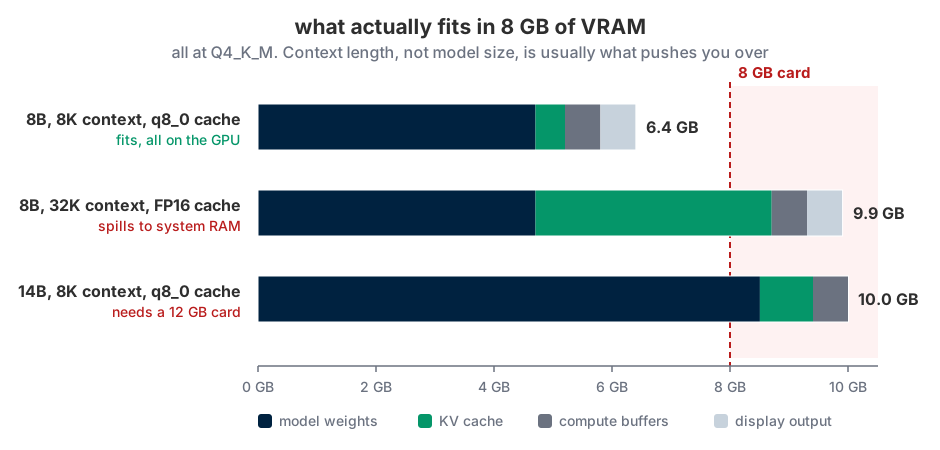
Look at the middle bar. That is the same 8B model as the top one, at the same quantisation, on the same card. The only change is a longer context and an unquantised cache, and the KV cache has gone from a sliver to the second largest thing in the budget. This is what people mean when they say context is expensive, and it is why the fix for “it does not fit” is often to reduce context rather than to change model.
Now consider what happens when it does not fit.
The inference engine does not refuse to run. It offloads - keeps some layers on the GPU and puts the rest in system RAM, where the CPU handles them. The model still works. It just collapses in speed, typically from 40-ish tokens per second to low single digits. Dave will recognise the feeling: it is the local model equivalent of discovering the game has quietly fallen back to integrated graphics.
The reason is bandwidth. Dave’s 3070 reads its own memory at roughly 448 GB/s. His system RAM manages perhaps 50 GB/s, and anything crossing between the two goes over the PCIe bus, which is narrower still. Since generating each token means reading the entire model, the slowest path in that chain sets the pace. One layer in the wrong place drags everything down to its speed.
This produces the single most important habit for anyone running models locally: check that the model is entirely on the GPU. In Ollama that is one command:
ollama psIf the PROCESSOR column says 100% GPU, all is well. If it shows any CPU percentage at all, part
of the model is in system RAM and performance is being thrown away. Beginners routinely conclude
that local models are hopelessly slow when what has actually happened is a silent offload.
Context windows and the KV cache
The context window is how much text the model can consider at once - the prompt, the documents pasted in, and the conversation so far, all counted in tokens. Typical values today run from 8K to 128K.
Two things about it consistently surprise newcomers.
Context is not memory. Nothing is retained between conversations. The reason a chatbot appears to remember what you said earlier is that the entire conversation is resent with every message. When the conversation outgrows the window, the oldest parts fall out and are simply gone.
Context is not free. This is where the KV cache comes in - and it is the concept that most often ambushes people who have already got everything else straight.
When the model processes a token, it computes intermediate values (the “keys” and “values” of its attention mechanism) for that position. Rather than recompute them for every subsequent token, it caches them. That cache is the KV cache, it lives in VRAM alongside the weights, and it grows linearly with the number of tokens in play.
For an 8B model the cost is roughly 128 KB per token at full precision. That sounds trivial until you multiply it:
| Context length | KV cache (FP16) | KV cache (q8_0) | Plus 4.7 GB of weights |
|---|---|---|---|
| 4K tokens | ~0.5 GB | ~0.25 GB | Comfortable |
| 8K tokens | ~1.0 GB | ~0.5 GB | Comfortable |
| 16K tokens | ~2.0 GB | ~1.0 GB | Tight, but workable quantised |
| 32K tokens | ~4.0 GB | ~2.0 GB | Over the line at FP16 |
| 128K tokens | ~16 GB | ~8 GB | Not happening on this card |
So when Dave reads that a model “supports 128K context”, that is a property of the model, not a promise about his hardware. He can run that model. He cannot give it 128K tokens of context without 16 GB of VRAM spare for the cache alone.
KV cache quantisation is the same trick applied to the cache instead of the weights: store it at 8 bits rather than 16 and it halves, for a quality cost most people never notice. On an 8 GB card it is close to free capability, which is why the setting is worth knowing about.
CUDA and the rest of the software stack
CUDA is NVIDIA’s programming interface for running general computation on their GPUs. It is not an AI thing specifically - it long predates the current wave - but every serious local inference engine is built against it, which is why “does it support CUDA” is shorthand for “will this run properly on my NVIDIA card”.
The stack Dave ends up with, bottom to top:
| Layer | What it is |
|---|---|
| NVIDIA driver | Makes the card work at all |
| CUDA runtime | Lets software run computation on the card |
| llama.cpp | The inference engine - does the actual arithmetic, handles quantised weights |
| Ollama | Wraps llama.cpp in a model manager and an HTTP API |
| Open WebUI, editor plugins, your scripts | Whatever talks to that API |
Dave installs the driver and Ollama; the middle layers come along for the ride. Almost everyone starts with Ollama because it reduces “run a language model” to two commands, and its API mimics OpenAI’s closely enough that existing tools point at it with a changed URL.
On other hardware: AMD cards use ROCm and work, with more friction and narrower model support. Apple Silicon works well through Metal, helped by unified memory, so the whole system RAM is available to the GPU - an M-series Mac with 32 GB can run models an 8 GB NVIDIA card cannot, though more slowly than the raw numbers suggest. Intel Arc is improving but is still the adventurous choice.
Speed: what tokens per second actually feels like
Generation speed is quoted in tokens per second, and it splits into two phases people often conflate.
Prefill (or prompt processing) is the model reading your input. It is highly parallel and fast - thousands of tokens per second - but it is why pasting a 40-page document produces a pause before anything appears.
Decode is the generation of new tokens, one at a time, each requiring a full pass over the weights. This is the number usually quoted, and it is bounded by memory bandwidth rather than compute.
For reference points Dave can feel:
- Reading speed for a person is around 5-6 tokens per second.
- 35-50 tokens/sec is what his 3070 should manage with an 8B at Q4_K_M - roughly seven times faster than he can read, so output appears effectively instantly.
- 10-15 tokens/sec is usable but visibly typing itself out.
- Under 5 tokens/sec is painful for chat, and is the signature of a model that has partly offloaded to CPU.
A rough estimate for decode speed is memory bandwidth divided by model size: 448 GB/s over a 4.7 GB model suggests a ceiling near 95 tokens/sec, and real-world efficiency lands somewhere around half of that. The same arithmetic on system RAM at 50 GB/s explains why CPU-only inference produces single digits.
What Dave can and cannot do with 8 GB
Now the vocabulary pays off. Here is his list, with verdicts.
General chat and drafting - comfortably yes
A current 8B instruct model at Q4_K_M handles conversation, drafting, rewriting, explaining and translating perfectly well. It will be a step below a frontier cloud model on nuance and on obscure facts, and indistinguishable for most everyday work. This is the use case local models are best at, and the one that surprises Dave most. He expected a toy. He got something that drafts his emails faster than he can read them, on a card he bought to shoot people in a dystopia.
Summarising long documents - yes, with the context caveat
A 40-page planning application is roughly 25,000 tokens. At 8K context that does not fit, and this is where beginners hit their first genuine wall.
Three real options: raise the context to 16K or 32K with a quantised KV cache and accept the VRAM cost; chunk the document, summarise each part and then summarise the summaries, which is what most tooling does automatically; or move to a machine with more VRAM. Chunking is free and works well, so it is where he should start.
Coding assistance - yes for functions, no for “understand my codebase”
An 8B coder model is genuinely useful for writing a function, explaining unfamiliar code, drafting tests, and translating between languages. Editor plugins that speak the OpenAI API point at his machine and cost nothing to leave running all day.
What it cannot do is hold a 200,000-line codebase in mind. That is a context limit, not an intelligence limit - the code does not fit in the window, at any quantisation. Tools that appear to manage it are retrieving selected fragments rather than reading everything, which is the next section. For genuinely hard, whole-repository reasoning, a frontier model remains the better tool.
Questions over his own documents - yes, but not the way he expects
Dave’s instinct is that the model needs to be fine-tuned on his documents. That instinct is almost always wrong, and it is the most common misconception in this entire subject.
Fine-tuning adjusts the weights to change behaviour and style. It is a poor and expensive way to insert facts, it needs to be redone whenever the documents change, and doing it well on 8 GB is awkward at best.
What he actually wants is RAG - retrieval-augmented generation. The mechanism is simpler than the acronym suggests:
- Chop the documents into passages.
- Run each passage through an embedding model, which converts text into a vector - a list of numbers positioning that text by meaning, so that similar meanings sit close together.
- Store the vectors in a vector database.
- When a question is asked, embed the question, find the nearest passages, and paste them into the prompt as context.
The model never learns anything. It is handed the relevant pages at the moment it needs them, which is why the answers can cite sources and why updating the documents is just a re-index. Embedding models are tiny - under 300 MB - and sit in VRAM alongside the chat model without trouble. Open WebUI does all of this out of the box.
”The same thing as the big cloud models” - no
This is the one that is genuinely impossible, and it is worth being blunt about.
Frontier cloud models are enormous - the ones in the hundreds of billions of parameters, running on racks of datacentre GPUs with far more memory than any consumer card. A 70B model at Q4 is a 40 GB file, which needs about 48 GB of VRAM to run properly. That is two RTX 3090s at minimum, and 70B is the small end of what the cloud is serving.
The honest framing is that local models are not a replacement for frontier models. They are a different tool with a different set of advantages: private, unmetered, always available, and good enough for a large share of everyday work. Dave should keep a cloud model bookmarked for the hard problems and stop expecting the 8 GB card to be one.
This is the point where a lot of people give up, having decided that if it is not a frontier model it is not worth running. That is the wrong conclusion, and the next two sections are why.
How to read a model name
Model names look like registration plates until you know the fields. Take this one:
qwen3:8b-instruct-q4_K_M
 |     |     |       |
 |     |     |       +-- quantisation: ~4.5 bits per weight, k-quant, medium
 |     |     +---------- tuning: instruction-following, i.e. built for chat
 |     +---------------- size: 8 billion parameters
 +---------------------- family and generation: Qwen, version 3
The tuning field is the one worth pausing on:
- base - raw text completion, not conversational. Not what Dave wants.
- instruct or chat - tuned to follow instructions and hold a conversation. The default choice.
- coder - further tuned on source code. Worth having alongside a general model.
- vision or VL - multimodal, accepts images. Note that the vision encoder costs 1-2 GB of VRAM permanently, even for text-only prompts, which is a poor trade on an 8 GB card unless he genuinely needs it.
- reasoning, thinking, or R1-style - trained to work through problems step by step before answering. Better at multi-step logic, and much slower, because those steps are generated tokens too.
What more VRAM would buy him
If Dave enjoys this and starts eyeing an upgrade, VRAM is the specification that matters. Not the model number, not the core count - the memory.
| VRAM | Comfortable model size | What changes |
|---|---|---|
| 8 GB | 7-9B | Everyday chat, coding help, RAG. Context capped around 8-16K |
| 12 GB | 12-14B | Noticeably better reasoning; comfortable 32K context |
| 16 GB | 14B, or 8B with very long context | Room for a chat model and an embedding model with headroom |
| 24 GB | 32B | The point where local output starts to feel close to cloud for many tasks |
| 48 GB (2 cards) | 70B | Genuinely strong, at roughly the price of a used car |
Two things to know about multiple cards. Inference engines will split a model’s layers across GPUs, so two 12 GB cards can run what one 24 GB card runs - but the whole thing moves at roughly the pace of the slower card, and a second card brings its own demands on PCIe lanes and power supply. And system RAM is not a substitute: it is where offloading goes to die, not extra VRAM.
Dave’s practical move, before spending anything, is to run an 8B properly and find out whether the quality is sufficient for what he actually does. Most people discover the limit that bothers them is context length rather than model size, and that changes what they should buy.
Where Dave ends up
He pulls an 8B instruct model at Q4_K_M, which lands as a 4.7 GB file. He checks ollama ps, sees
100% GPU, and watches it produce text faster than he can read it. He points his editor at it and
stops pasting work code into a browser. He indexes his PDF pile with an embedding model and asks it
where the boiler warranty went.
He does not summarise a 40 page planning application in one shot, because 25,000 tokens do not fit in his context window, so he chunks it like everybody else does. He does not get a frontier model, because a frontier model does not fit on a card that also has to render Night City.
What he gets is a private, unmetered, always-on assistant that handles most of what he was paying a subscription for, running on hardware he already owned. For a card bought under slightly false pretences, that is a decent second act.
Frequently asked questions
What is a token in an LLM?
A chunk of text between a letter and a word, drawn from the model’s fixed vocabulary. English prose runs about 0.75 words per token, or four characters. Context windows, generation speed and cloud API pricing are all measured in tokens rather than words.
What does the “8B” in a model name mean?
Eight billion parameters - the count of numbers stored in the model file. More parameters generally means more capability, but it costs VRAM proportionally, and a recent 8B will beat an older, larger model on most tasks.
What is quantisation and does it hurt quality?
Storing each weight at reduced precision to shrink the file - 16 bits down to roughly 4.5 at Q4_K_M, which takes an 8B model from 16 GB to 4.7 GB. Q4_K_M costs a small, measurable amount of quality that most users never notice. Below Q3 the degradation becomes obvious, and a smaller model at Q4 is a better choice than a larger one at Q2.
How much VRAM do I need to run a local LLM?
8 GB runs 7-9B models comfortably and is a genuinely useful starting point. 12 GB opens up 14B, 24 GB opens up 32B, and 70B models need around 48 GB. Weights are only part of it - the KV cache for long contexts can consume several gigabytes on its own.
What is the KV cache?
Cached intermediate values for every token currently in context, held in VRAM so the model does not recompute them for each new token. It grows linearly with context length - around 128 KB per token for an 8B model - which is why long contexts consume memory so aggressively. Quantising it to 8 bits halves the cost for a negligible quality change.
Should I fine-tune a model on my own documents?
Almost certainly not. Fine-tuning changes behaviour and style, not facts, and must be redone whenever your documents change. To make a model answer questions about your own material, use RAG: embed the documents, retrieve the relevant passages at query time, and pass them to the model as context.
Why is my local model so slow?
Most often because it is not entirely on the GPU. Run ollama ps and check that the processor column
reads 100% GPU - any CPU share means part of the model is in system RAM, which is roughly ten times
slower to read. The usual culprits are a model too large for the card or a context window set too
high.
Can I run ChatGPT-class models at home?
Not on consumer hardware. Frontier models run to hundreds of billions of parameters on racks of datacentre GPUs. A 70B model - well below frontier scale - already needs around 48 GB of VRAM. Local models are a different tool: private, unmetered and always available, rather than a replacement.
Glossary
| Term | Meaning |
|---|---|
| Token | Sub-word unit of text. Roughly 0.75 words |
| Parameter / weight | One of the billions of numbers in the model file |
| Inference | Running a trained model to produce output |
| Training | Producing the model in the first place. Datacentre work, not home work |
| Fine-tuning | Adjusting an existing model’s behaviour on extra data |
| Quantisation | Storing weights at lower precision to shrink the model |
| GGUF | The file format holding a quantised model and its metadata |
| VRAM | Memory on the graphics card. The binding constraint |
| Offloading | Running part of a model on the CPU because it will not fit in VRAM. Slow |
| Context window | How much text the model can consider at once, in tokens |
| KV cache | Per-token cached state in VRAM. Grows with context length |
| Prefill | Processing the input prompt. Fast and parallel |
| Decode | Generating output one token at a time. The speed people quote |
| CUDA | NVIDIA’s interface for running computation on their GPUs |
| Embedding | A vector representing the meaning of a piece of text |
| RAG | Retrieving relevant passages and passing them to the model as context |
| Instruct / base | Tuned for following instructions, versus raw text completion |
| Temperature | Randomness of token selection. Lower is more predictable |
Related guides
- Best GPU for Running Local LLMs: A VRAM-First Buyer’s Guide - which card to buy, by memory tier
- How LLMs Actually Work: Neural Nets, GPUs and One 2017 Paper - what a model is under the bonnet, and the paper that started it
- Build a Headless Ubuntu LLM Server with Ollama on 8 GB VRAM - the practical build, once the vocabulary makes sense
- Local AI guides - more on running models on your own hardware
This article may contain affiliate links to Amazon, eBay and other retailers. I may earn a small commission from qualifying purchases made through these links at no additional cost to you.